Anime Shop Simulator Free Download PC – Build Your Own Anime Store
Anime Shop Simulator is a first-person business simulation game where you take control of your own anime store and turn a small shop into a successful otaku destination. Instead of simply managing numbers from a menu, you walk around your store, arrange products, serve customers, manage stock, decorate the interior, and make decisions that influence the growth of your business.
Developed by One More Time and published by One More Time and Polnoch, Anime Shop Simulator released for Windows PC on September 11, 2026. The game supports single-player gameplay as well as online co-op for up to four players, allowing friends to work together while building and expanding an anime merchandise business.
The game combines shop management with anime collectibles, trading cards, customization, events, and even PvP card battles. You can stock shelves with manga, figures, collectible cards, and other merchandise, then improve your store as your customer base and profits grow.
For players searching for Anime Shop Simulator free download, an official demo is also available on Steam. The complete game is a paid release, while the demo provides a way to experience the game’s core concept before purchasing the full version.

What Is Anime Shop Simulator?
Anime Shop Simulator is a first-person shop-management game focused on running an anime-themed retail business.
Your objective is to transform a small boutique into a successful anime shop. You are responsible for deciding what products to stock, how to arrange your shelves, how to decorate the store, and how to keep customers satisfied.
The first-person perspective makes the experience more hands-on than a traditional management simulator. Rather than controlling everything from an abstract management screen, you physically interact with your store and its products.
You can arrange merchandise around the shop and create a layout that makes the store feel organized and attractive. As the business develops, you can expand the shop and improve its appearance.
The game also supports online multiplayer, giving you the option to run your anime store alone or cooperate with friends.
Anime Shop Simulator Gameplay
The gameplay revolves around managing a growing anime merchandise business.
At the beginning, your shop is relatively small. Your goal is to make smart decisions with your available resources and gradually build a more successful store.
A typical session can involve several different tasks:
- Ordering new merchandise
- Stocking shelves
- Organizing products
- Serving customers
- Managing the store layout
- Opening collectible card packs
- Searching for rare cards
- Improving shop decorations
- Expanding the store
- Organizing events
- Managing finances
- Playing card battles
This mixture gives Anime Shop Simulator more variety than a basic shop-management game.
You are not simply buying products and waiting for money to appear. The first-person format encourages you to stay involved with the physical side of running the store.
Build Your Own Anime Shop
One of the main attractions of Anime Shop Simulator is the ability to create your own store.
You start with a small business and gradually turn it into an anime-focused shopping destination. The game lets you decide how the shop should look and what kind of merchandise should fill its shelves.
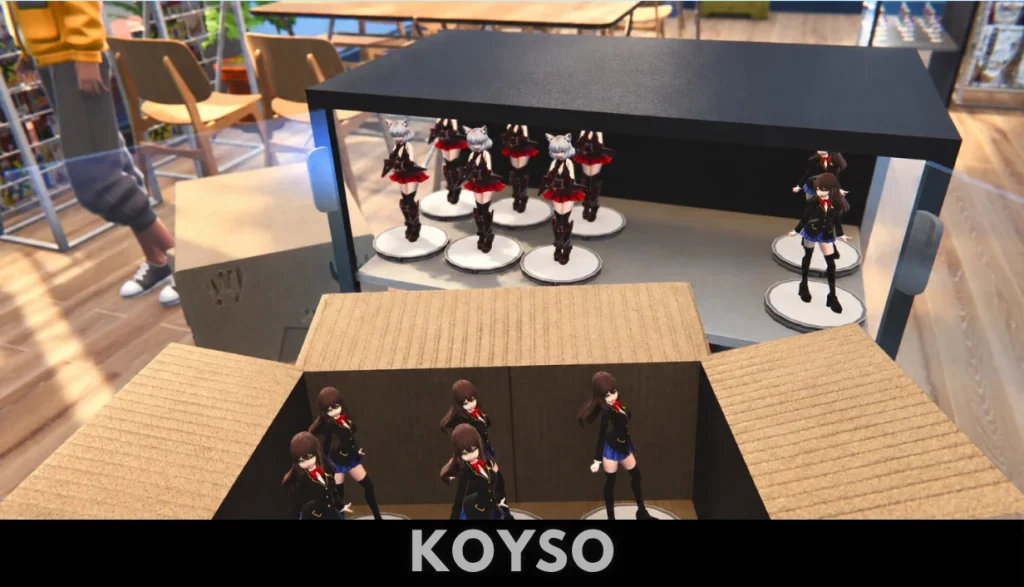
The arrangement of your products is part of the experience. Manga, figures, collectible cards, and other anime merchandise can be placed throughout the store to create your desired shopping environment.
As your business grows, you can enlarge the store and upgrade its decoration.
This progression gives you a clear long-term objective: start small, earn money, improve your shop, and eventually create a much larger otaku hub.
Store Layout
A good shop needs more than products.
How you arrange your merchandise can influence how the store feels and how customers move through it. Keeping shelves organized can make the shop look more professional while allowing you to create dedicated areas for different types of merchandise.
You can experiment with the placement of products and decorations until the store feels like your own.
Store Name and Decoration
Customization allows you to give your business its own identity.
You can choose a name for your shop and customize its appearance with wallpapers and decorative objects. This gives the store a personal touch instead of making every player’s business look identical.
The decoration system is especially appealing if you enjoy simulation games where building and designing your own space is part of the fun.
Stock Manga, Figures, and Collectibles
Merchandise is the foundation of your business.
Anime Shop Simulator lets you stock different types of products, including manga, figures, and collectible cards. The available merchandise gives you several categories to manage as you develop your store.
The challenge is balancing customer demand with your available budget.
Ordering too much merchandise can tie up your money, while keeping shelves empty can make your store less attractive and reduce potential sales.
This creates a simple but important management loop:
Order → Stock → Sell → Earn → Expand → Restock
As your business becomes larger, managing this cycle becomes increasingly important.
Order Products and Manage Inventory
Inventory management is an important part of running the shop.
You need products available for customers to buy, which means keeping track of what is selling and making sure your store does not run out of popular merchandise.
Ordering products requires you to think about how you want to spend your business funds.
Instead of purchasing everything available, you can focus on products that fit your current strategy. A store that concentrates on collectible cards may operate differently from one that emphasizes manga and figures.
The freedom to decide what your shop should focus on gives the simulation a more personal feel.

Collectible Cards and Booster Packs
Trading cards are one of the game’s biggest features.
Anime Shop Simulator lets you open booster packs and search for unique and rare collectible cards. Once you discover cards, you can decide whether to sell them for profit or keep them as part of your own collection.
This creates an additional reason to open packs beyond simply stocking the shop.
A rare card can potentially become a valuable part of your collection, while unwanted cards can be treated as merchandise.
Build Your Card Collection
If you enjoy collectible card games, the collecting side of Anime Shop Simulator adds another progression system.
You can search for rare cards and gradually build a collection while operating your business.
This creates an interesting contrast between business decisions and personal collecting.
Selling a valuable card may provide useful income, but keeping it can help build your collection.
Rare Card Hunting
Opening booster packs introduces an element of discovery.
You never know exactly what you will find, which makes each pack more interesting. Rare cards can become desirable items, giving you another reason to keep expanding your collection.
The collectible system also connects directly with the game’s PvP card battles.
PvP Trading Card Game Battles
Anime Shop Simulator is not limited to shop management.
The game also includes PvP trading card game battles. Players can use their collectible cards to compete against other players and see who has built the stronger collection and strategy.
This adds a competitive element to a game that otherwise focuses heavily on business simulation.
Your cards therefore have two possible roles.
They can be valuable merchandise that you sell for profit, or they can become part of your personal collection and be used in card battles.
This gives collectible cards more purpose than simply being another inventory item.
Four-Player Online Co-Op
Anime Shop Simulator supports online co-op for up to four players.
Instead of running the store alone, you can invite friends to work together and divide responsibilities. The developers describe the co-op mode as a way for players to manage the store together, plan strategies, and work toward increasing profits.
This can make the experience very different from solo play.
One player might focus on stocking products, another could handle customers, while others concentrate on organizing the shop or managing different tasks.
The shared responsibilities can make a busy store feel more like a cooperative business.
Play With Friends
The four-player system is particularly useful for groups that enjoy simulation games.
Instead of competing over resources in a traditional multiplayer game, everyone works toward the same shop-management goal.
You and your friends can develop a shared strategy and decide how to divide responsibilities.
The result can be a more social version of the shop simulation.
Events and Anime Festivals
The game also allows you to organize special events to attract customers.
Events can include autograph signings and trading card tournaments designed to bring anime fans into your store. These activities can increase the popularity of the business while making the shop feel more like a community destination.
Events give you another way to grow beyond everyday retail sales.
Instead of relying entirely on normal customer traffic, you can use special activities to create excitement around your shop.
Trading Card Tournaments
Card tournaments fit naturally into the game’s collectible card system.
You can use events to bring card enthusiasts into the store and create another reason for customers to visit.
This connects several systems together:
- Collecting cards
- Selling cards
- PvP battles
- Hosting tournaments
- Attracting customers
- Increasing shop popularity
That interconnected design helps Anime Shop Simulator feel like more than a basic retail simulator.
Grow and Expand Your Business
Business growth is the long-term objective.
Your small anime shop can be expanded as your business becomes more successful. You can improve the store’s appearance, enlarge the available space, and adapt to changing anime industry trends.
Expansion gives you something to work toward after you have learned the basics.
At first, you may be focused on simply keeping shelves stocked and making enough money to continue operating.
Later, the goal becomes creating a much larger and more attractive anime destination.
Improve Your Store
Store upgrades allow you to make the business feel more developed.
As you earn more money, you can invest in the appearance and size of the shop. This gives your progression a visible result because the business changes as you become more successful.
The store is therefore not just a menu or background. It becomes the physical representation of your progress.
Customer Satisfaction and Financial Success
Running a shop means balancing two important goals: keeping customers happy and making money.
A store can have great products but still struggle if the business finances are poorly managed.
Likewise, focusing entirely on profit can make the shopping experience less appealing.
Anime Shop Simulator asks you to balance these priorities.
You need to consider what customers want, which products should be stocked, how the store should look, and how much money you can safely spend on expansion.
This makes each business decision part of a larger strategy.
Anime Shop Simulator Customization
Customization is another major part of the game.
You can give your store a unique name, choose wallpapers, and place decorative items around the shop.
This means the final store can reflect your personal taste.
Some players may want a colorful merchandise-filled shop, while others may prefer a more organized layout with dedicated sections for different product categories.
Because decoration is integrated with business progression, improving the store can be both visually satisfying and part of the larger goal of building a successful anime destination.
First-Person Simulation Experience
The first-person perspective changes the way you interact with the game.
Instead of looking at your business from a distant management screen, you experience the shop directly.
You can walk around your store, inspect products, organize merchandise, and experience the environment you have created.
This approach is especially suitable for players who enjoy immersive simulation games.
The store becomes a place that you can physically navigate rather than simply a collection of statistics.
Anime Shop Simulator Features
The game combines several systems into one package.
First-Person Shop Management
Run your anime store from a first-person perspective and take responsibility for its daily operations.
Anime Merchandise
Stock shelves with manga, figures, collectible cards, and other merchandise.
Store Customization
Give your business a unique name and customize its interior with wallpapers and decorations.
Business Expansion
Grow your shop, improve its appearance, and expand the business as your profits increase.
Online Co-Op
Play with up to four players online and divide shop-management responsibilities between friends.
Collectible Cards
Open booster packs and discover rare cards that can be sold or added to your collection.
PvP TCG
Use collectible cards in PvP trading card battles against other players.
Special Events
Host autograph events and card tournaments to attract more customers and increase shop popularity.
Single-Player Mode
If you prefer playing alone, the game also supports a solo experience.
Graphics and Visual Style
Anime Shop Simulator uses a 3D first-person presentation designed around the physical store environment.
The visual focus is naturally placed on the merchandise and the shop itself. Shelves, products, decorations, and customer activity help make the business feel like an actual retail location rather than a traditional spreadsheet-style simulator.
The ability to customize the interior also gives the visuals a player-driven quality.
Your shop does not have to look exactly like another player’s shop. The products you stock and the decorations you select can create a different atmosphere.
Why Play Anime Shop Simulator on PC?
Anime Shop Simulator is a good choice for players who enjoy management games but want something more hands-on.
The first-person perspective makes routine shop tasks more interactive, while the collectible card system adds another layer beyond normal retail management.
The game is also attractive for players who enjoy cooperative simulation games because up to four people can manage the store together.
There is also plenty of variety between the different systems. You can focus on business management, shop customization, card collecting, PvP, events, or expansion.
This makes the game suitable for several types of simulation fans.
Anime Shop Simulator Free Download
Players searching for Anime Shop Simulator free download should know the difference between the official demo and the full game.
The full version is a paid PC release. Steam lists the game as a one-time purchase rather than a free-to-play title.
An official demo is also available. The demo can be used to test the core gameplay before purchasing the complete game. Steam’s demo listing provides the same basic PC hardware requirements as the game’s store information.
For players who want to try the game without buying the complete version, the official demo is the appropriate option.
Avoid unofficial downloads that claim to provide a free full copy, particularly when they require unknown launchers or suspicious executable files.
Anime Shop Simulator PC System Requirements
Before installing the game, make sure your PC meets the listed minimum requirements.
Minimum Requirements
- Operating System: Windows 10 64-bit
- Processor: Intel Core i3 3.0 GHz or Ryzen 3xxx
- Memory: 4 GB RAM
- Graphics: NVIDIA GeForce GTX 960 with 4 GB VRAM
- DirectX: Version 11
- Storage: 3 GB available space
Steam currently lists these as the minimum specifications.
Recommended Requirements
Steam currently does not provide a complete recommended CPU and GPU configuration on the store page. The recommended section only confirms the requirement for a 64-bit processor and operating system.
Because of that, it is better not to treat unofficial recommended specifications as official hardware requirements.
If you are unsure whether your computer can handle the game, trying the official demo is a practical way to test performance on your own hardware.
Tips for New Players
Keep Your Shop Organized
A well-organized store is easier to manage and gives you more control over where different merchandise is displayed.
Do Not Overspend Early
Your initial funds are important.
Avoid spending everything on decoration or merchandise before you have established a reliable source of income.
Watch Your Stock
Empty shelves mean missed opportunities.
Keep track of popular products and make sure you have enough merchandise available for customers.
Experiment With Store Layouts
Do not feel locked into your first arrangement.
As your store grows, you can reorganize the interior to make better use of the available space.
Pay Attention to Collectible Cards
Booster packs can provide cards that are useful for either selling or collecting.
Think carefully before deciding what to do with valuable cards.
Try Co-Op
If you have friends who enjoy simulation games, the four-player co-op mode can make shop management more social and enjoyable.
Invest in Growth
Once your store is generating reliable income, consider putting some of your profits toward expansion and improvements.
Is Anime Shop Simulator Multiplayer?
Yes. Anime Shop Simulator supports online co-op for up to four players. It also includes online PvP through its trading card game system.
The co-op mode allows friends to work together on the same shop, while PvP gives players an opportunity to compete with their collectible card decks.
This combination makes the game more multiplayer-focused than many traditional shop simulators.
Is Anime Shop Simulator Single Player?
Yes. The game supports single-player gameplay as well as online multiplayer.
You can therefore enjoy the shop-management experience without needing other players.
Solo play can be useful for learning the game’s systems, developing your preferred shop layout, and understanding the business mechanics before joining a multiplayer session.
Is Anime Shop Simulator a Trading Card Game?
It includes a trading card game component, but Anime Shop Simulator is primarily a shop-management simulation.
The collectible card system lets you open booster packs, find rare cards, collect them, sell them, and use them in PvP TCG battles.
This makes cards an important part of the experience without turning the entire game into a conventional standalone card game.
Who Should Play Anime Shop Simulator?
Anime Shop Simulator is especially suitable for players who enjoy:
- Shop management games
- Business simulation
- Anime-themed games
- Trading card games
- Collecting systems
- First-person simulation
- Store customization
- Casual management games
- Multiplayer co-op
- PvP card battles
If you enjoy the idea of creating your own anime store and watching it develop from a small business into a larger destination, the game offers several systems built around that fantasy.
Final Verdict
Anime Shop Simulator combines anime merchandise, business management, store customization, collectible cards, and multiplayer gameplay into a first-person simulation experience.
The core idea is easy to understand: start with a small anime shop, stock it with merchandise, attract customers, make money, improve the store, and gradually turn it into a successful otaku destination.
What makes the game more interesting is everything built around that basic concept. You can collect rare cards, sell merchandise, organize events, customize your store, expand the business, compete in PvP card battles, or invite friends to help manage the shop.
The four-player co-op mode gives the game an additional social dimension, while the single-player mode means you can still enjoy the experience independently.
For anyone searching for an Anime Shop Simulator free download, the official demo is the safest way to try the game without purchasing the complete release. The full PC version is a paid title, so players who want the complete experience should use an authorized source.
Overall, Anime Shop Simulator is a promising option for players who like shop simulators, anime collectibles, trading cards, business management, and cooperative games. Its combination of retail management and collectible card gameplay gives it a distinct identity within the simulation genre.
Frequently Asked Questions
Is Anime Shop Simulator free to download?
The full game is a paid PC release, but an official demo is available for players who want to try the game before purchasing it.
When was Anime Shop Simulator released?
Anime Shop Simulator was released for Windows PC on September 11, 2026.
Who developed Anime Shop Simulator?
The game was developed by One More Time. One More Time and Polnoch are listed as publishers on Steam.
Is Anime Shop Simulator available on PC?
Yes. The game is available for Windows PC and requires a 64-bit operating system and processor.
Does Anime Shop Simulator have multiplayer?
Yes. It supports online co-op for up to four players and also includes online PvP through its trading card game system.
Can I play Anime Shop Simulator alone?
Yes. Single-player gameplay is supported, so you do not need friends or other players to run your store.
What can I sell in Anime Shop Simulator?
The game lets you stock your store with products such as manga, figures, collectible cards, and other anime merchandise.
Can I customize my anime shop?
Yes. You can choose a shop name, change wallpapers, and decorate the store with different items.
Does Anime Shop Simulator have a card game?
Yes. You can open booster packs, collect rare cards, sell cards for profit, and use your collection in PvP TCG battles.
Can I host events in Anime Shop Simulator?
Yes. The game includes events such as autograph signings and trading card tournaments that can attract anime fans and increase shop popularity.
What are the minimum Anime Shop Simulator PC requirements?
The Steam listing specifies Windows 10 64-bit, an Intel Core i3 3.0 GHz or Ryzen 3xxx processor, 4 GB RAM, an NVIDIA GeForce GTX 960 with 4 GB VRAM, DirectX 11, and 3 GB of available storage.
Does Anime Shop Simulator have a demo?
Yes. An official Steam demo is available.
Is Anime Shop Simulator worth playing?
If you enjoy shop-management games with anime collectibles, customization, card collecting, and multiplayer features, Anime Shop Simulator offers a varied experience built around those systems.