Sporting Goods Shop Download – PC Game Guide
If you enjoy management games where you can build a business from the ground up, Sporting Goods Shop offers a relaxed but surprisingly detailed experience. Developed by Business Tycoon, this first-person shop simulation puts you in charge of your own sports retail business. You start with a small store and gradually turn it into a much larger sporting goods shop by managing products, customers, employees, finances, and store expansion.
The game combines shop management with everyday tasks that make the business feel active. You can order merchandise, unpack deliveries, arrange products on shelves, set prices, serve customers, handle online orders, and keep the store clean. As the business grows, you can hire employees to take care of different responsibilities and expand both your shop and warehouse.
For players searching for Sporting Goods Shop Download, there is also an official free prologue available, allowing players to experience the core concept before purchasing the full game. The full version is commercially available for PC, while the prologue provides a legitimate free way to try the experience.
Sporting Goods Shop Download for PC
Sporting Goods Shop is a first-person business simulation focused on running a sports equipment store. Instead of simply watching numbers increase on management screens, you actively move around the shop and perform many tasks yourself.
At the beginning, your store has limited space and resources. You need to decide which products to stock, how much to charge, and where to place everything. Good organization can make the shopping experience smoother, while poor decisions can leave products sitting on shelves without attracting customers.
The game also gives you the freedom to play alone or cooperate with friends. Its online co-op mode supports up to four players, allowing everyone to share responsibilities around the store.
Build Your Own Sporting Goods Business
The main objective is straightforward: grow a small sports shop into a successful retail business.
However, making money requires more than simply filling shelves. You need to understand what customers want, keep enough products in stock, maintain reasonable prices, and make sure the store operates efficiently.
As your business develops, you gain access to more products, larger spaces, additional employees, and new management possibilities.
Start Small and Grow
Your first store provides a foundation for the larger business you want to create. Early decisions can have a major impact on how quickly you can expand.
You can focus on popular products, monitor market prices, and purchase merchandise when favorable opportunities appear. Profits can then be reinvested into the business.
The progression system gives you several goals to work toward:
- Increase store revenue
- Expand the shop
- Expand warehouse capacity
- Add more products
- Hire employees
- Improve checkout efficiency
- Manage online orders
- Keep customers satisfied
- Protect merchandise from thieves
- Improve the overall shopping experience
Manage Your Store in First Person
One of the defining features of Sporting Goods Shop is its first-person perspective. You are not simply controlling an abstract business from a menu.
You physically move around your store while completing everyday tasks.
Deliveries need to be unpacked and products need to be placed in appropriate locations. Shelves must remain stocked, customers need to be served, and the store should stay clean.
This hands-on approach gives the simulation a more interactive feel compared with traditional tycoon games.
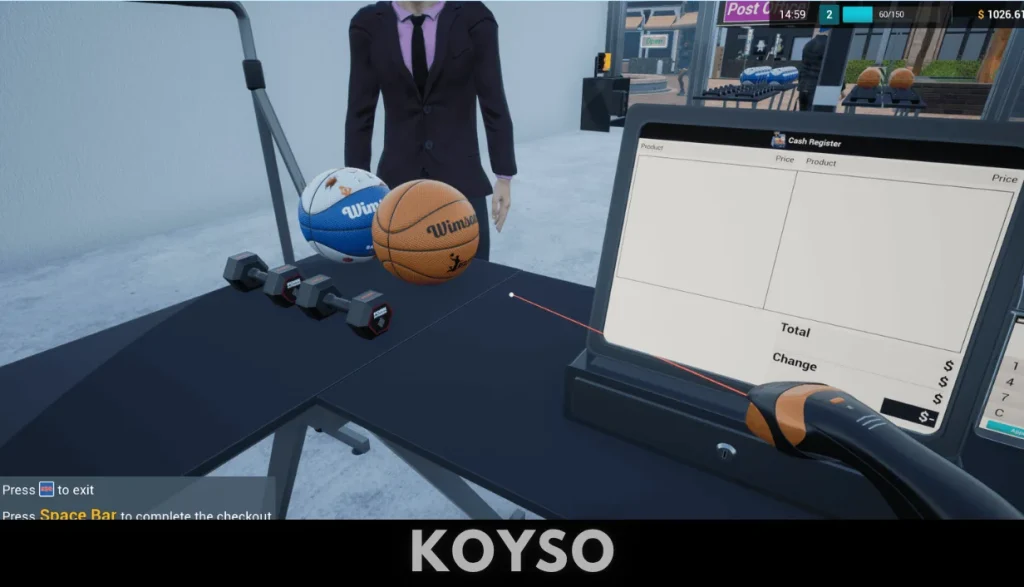
Order and Stock Products
Your in-game computer and tablet allow you to order merchandise while managing the store.
The product selection includes a broad range of sporting and fitness-related goods, including:
- Sports equipment
- Sports accessories
- Fitness products
- Gym equipment
- Skates
- Rackets
- Swimming goggles
- Golf clubs
- Boxing gloves
- Sports clothing
- Sports shoes
- Nutrition products
- Body-care products
Keeping the right products available is important because customers visit the store with different needs. Expanding your product portfolio can help you attract more shoppers and generate additional sales.
Sign Contracts With Brands
Growing a retail business also involves developing relationships with brands.
In Sporting Goods Shop, you can sign contracts with leading brands and use those partnerships to expand the merchandise available in your store. This gives the business side of the simulation another layer beyond simply buying random products.
Choosing what to stock becomes an important part of your strategy. You need to consider demand, available space, purchasing costs, and selling prices.
Set Your Own Prices
Pricing is another major part of the store-management system.
You can determine how much customers pay for your products, but setting extremely high prices can hurt customer satisfaction and reduce sales. On the other hand, prices that are too low may reduce your potential profit.
The game encourages you to pay attention to market prices when deciding how much to charge.
This creates a simple business challenge:
Buy intelligently, price competitively, sell efficiently, and reinvest your profits.
As the store becomes larger, these decisions become increasingly important because you have more products and expenses to manage.
Keep Customers Happy
A successful store needs more than products. Customers also expect a smooth shopping experience.
Long checkout lines can create unnecessary waiting times, so adding additional registers becomes useful as your customer traffic increases.
You also need to scan products and process payments using cash or cards.
Online orders add another responsibility to the daily workload. As your business expands, remembering to fulfill these orders becomes an important part of keeping the operation running smoothly.

Manage Checkout Queues
At first, managing a checkout may be easy enough to do yourself. As the store becomes busier, however, customer queues can become difficult to handle.
This is where additional cash registers and employees become useful.
Hiring cashiers allows you to reduce waiting times while giving you more freedom to concentrate on other parts of the business.
Hire Employees
Eventually, trying to handle every task yourself becomes inefficient.
Sporting Goods Shop lets you hire different workers to take over specific responsibilities.
You can hire:
- Stockers to refill shelves
- Cashiers to operate registers
- A janitor to clean the store
- A security guard to deal with thieves
Employees allow the business to operate more efficiently as it becomes larger. Instead of constantly running from one task to another, you can delegate responsibilities and focus on expansion and management.
Expand Your Warehouse
A bigger store needs more inventory.
Warehouse expansion gives you additional room to handle the growing product selection. As your product portfolio increases, storage becomes an important part of keeping the business organized.
Planning your available space carefully can help prevent your store from becoming difficult to manage.
Deal With Thieves
Not every challenge comes from customers.
The game also introduces thieves who can cause losses by stealing boxes and merchandise. This creates another financial concern for your business.
Hiring security staff can help protect the store and reduce the impact of theft.
This means your expenses are not limited to buying products. You also need to consider staffing, store maintenance, security, and expansion.
Keep the Store Clean
Cleaning is another small responsibility that can have a noticeable effect on your business.
Customers do not want to shop in a dirty environment, and the game encourages you to keep the store maintained.
You can eventually hire a janitor to handle cleaning duties. This is particularly useful once your business has expanded and you have more important tasks to manage.
Play Solo or With Friends
One of the strongest features of Sporting Goods Shop is its multiplayer support.
You can manage the entire store alone, or invite friends to share the workload. Online co-op supports up to four players.
Playing with friends can make routine tasks more entertaining because different players can divide responsibilities.
For example, one player can concentrate on ordering merchandise while another handles customers and checkout duties. Someone else can organize products or deal with other store tasks.
The more players you have, the more demanding the customer activity can become, giving the co-op mode an additional challenge.
Why Co-Op Works Well
The game’s tasks naturally lend themselves to teamwork.
A group can divide the workload instead of having one person perform everything. This makes the store feel busier and creates opportunities for funny or chaotic moments when several responsibilities appear at once.
If you prefer a slower management experience, the single-player mode lets you handle the business at your own pace.
Run Small Contests
The store is not only about selling products.
You can also organize small contests and reward customers with gifts. These activities provide another way to entertain shoppers and add variety to the normal retail routine.
Contests also fit naturally into the game’s sports-focused setting. Instead of feeling like a generic supermarket simulator, the game keeps its activities connected to the sporting goods theme.
Expand Your Sporting Goods Shop
Expansion is one of the main progression systems.
As your level and budget increase, you can expand the shop and warehouse, giving you more room for products and customers.
A larger store can support a wider product range, but it also introduces new management challenges.
More products mean more inventory to track. More customers mean longer potential queues. More space means more areas that need to be maintained.
The result is a progression loop built around growing the business while keeping its daily operations under control.
Gameplay Features
Here are some of the main features that make Sporting Goods Shop interesting for PC simulation fans:
- First-person sporting goods store management
- Single-player mode
- Online co-op for up to four players
- Product ordering and inventory management
- Brand contracts
- Adjustable product prices
- Customer management
- Online orders
- Multiple employee types
- Store and warehouse expansion
- Store cleaning
- Security management
- Small customer contests
- Cash and card payments
- Sports equipment and accessories
- Steam Achievements
- Steam Cloud support
- Steam Trading Cards
- Family Sharing support
Sporting Goods Shop Graphics and Presentation
The first-person presentation helps make the shop feel like an actual physical location.
You can walk through the store, organize products, interact with equipment, serve customers, and manage different areas of the business.
The visual style is focused more on creating a believable retail environment than delivering cinematic graphics. That approach works well for a simulation where the store itself is the main setting.
The environment gradually becomes more interesting as you expand the business and fill the shop with additional merchandise.
Sporting Goods Shop System Requirements
Before starting your Sporting Goods Shop Download, make sure your PC is capable of running the game.
According to the current Steam listing, the game requires a 64-bit processor and operating system. The minimum configuration includes an Intel Core i5-9400F or AMD Ryzen 5 3600, 8 GB RAM, and an NVIDIA GeForce GTX 1050 or AMD Radeon RX-580. Around 1.7 GB of available storage is listed, along with a broadband internet connection.
Minimum Requirements
- OS: Windows 7 64-bit, Windows 8 64-bit, or Windows 10 64-bit
- Processor: Intel Core i5-9400F / AMD Ryzen 5 3600
- Memory: 8 GB RAM
- Graphics: NVIDIA GeForce GTX 1050 / AMD Radeon RX-580
- Network: Broadband Internet connection
- Storage: 1.7 GB available space
- Architecture: 64-bit processor and operating system
Recommended Requirements
- OS: Windows 7 64-bit, Windows 8 64-bit, or Windows 10 64-bit
- Processor: Intel Core i5-11400F / AMD Ryzen 5 5600X
- Memory: 16 GB RAM
- Graphics: NVIDIA GeForce GTX 1060 / AMD Radeon R9-290X
- Network: Broadband Internet connection
- Storage: 1.7 GB available space
- Architecture: 64-bit processor and operating system
Is Sporting Goods Shop Worth Playing?
If you like shop-management and business simulation games, Sporting Goods Shop has an appealing gameplay loop.
The concept is easy to understand, but there are enough responsibilities to keep the store-management process interesting. You begin by handling basic tasks yourself and gradually build a business where employees can take over some of the workload.
The multiplayer option is another strong reason to consider the game. Running a sports store with friends can make otherwise routine activities more entertaining, especially when several customers need attention at the same time.
The sports theme also gives the game a different identity compared with general retail simulators.
Tips for New Players
Starting carefully can make the early stages of your business much easier.
1. Watch Your Prices
Do not randomly increase prices. Pay attention to market conditions and customer satisfaction when deciding how much to charge.
2. Keep Popular Products Available
Running out of important products can mean missed sales. Keep an eye on your inventory and order replacements before your shelves become empty.
3. Expand Gradually
Large expansions can increase your responsibilities. Make sure your business can afford new space and employees before expanding too quickly.
4. Hire Staff at the Right Time
Employees cost money, so hire them when their contribution can meaningfully improve the store’s efficiency.
5. Reduce Checkout Waiting
As customer numbers increase, additional cash registers and cashiers can help reduce queues.
6. Protect Your Inventory
Security becomes increasingly important as the store grows. Theft can directly affect your finances, making a security guard a useful investment.
7. Keep Everything Organized
A well-organized store makes it easier to find products, restock shelves, and handle daily responsibilities.
Sporting Goods Shop Download and Free Prologue
Players searching for a Sporting Goods Shop Download should know the difference between the full game and its free version.
The full PC game is a paid release, while the official Sporting Goods Shop: Prologue provides a free way to experience the concept. The prologue lets players run a sporting goods shop, order products, organize the business, and play either solo or with friends.
For anyone who wants to test the gameplay before purchasing the complete game, the official prologue is the safest option.
Avoid unofficial cracked or modified downloads. Besides being unauthorized, they can expose a PC to unwanted software and may not provide the current game version.
Frequently Asked Questions
What is Sporting Goods Shop?
Sporting Goods Shop is a first-person business simulation where you operate and expand a sports equipment store. You manage inventory, prices, customers, employees, orders, and store expansion.
Is Sporting Goods Shop available on PC?
Yes. The game is available for Windows PC.
Can I play Sporting Goods Shop alone?
Yes. The game supports single-player gameplay, allowing you to manage the entire shop yourself.
Does Sporting Goods Shop have multiplayer?
Yes. It includes online co-op for up to four players.
Is there a free version of Sporting Goods Shop?
An official free prologue is available separately, allowing players to try the core shop-management experience.
What can I sell in Sporting Goods Shop?
The game includes sports equipment and accessories, fitness and gym products, skates, rackets, swimming goggles, golf clubs, boxing gloves, sports clothing, shoes, nutrition products, body-care products, and other merchandise.
Can I hire employees?
Yes. You can hire stockers, cashiers, a janitor, and a security guard to help manage different areas of the business.
Can I expand my store?
Yes. Store and warehouse expansion is part of the game’s progression system. As your level and budget increase, you can grow the business and handle a larger operation.
Final Thoughts
Sporting Goods Shop is a hands-on retail simulator built around the idea of turning a small sports store into a successful business. Its first-person perspective makes everyday activities such as unpacking deliveries, stocking shelves, serving customers, and managing the shop feel more interactive.
The combination of inventory management, pricing, employees, expansion, customer service, and online orders gives the game a solid business-management foundation. The option to play solo or cooperate with up to three other players also makes it suitable for both individual players and small groups.
For players looking for a Sporting Goods Shop Download, the official free prologue is a useful starting point if they want to test the gameplay before buying the complete PC release. The full game is designed for players who enjoy building a business gradually, making strategic decisions, and watching their store grow from a small operation into a much larger sporting goods business.